 TW
TW  EN
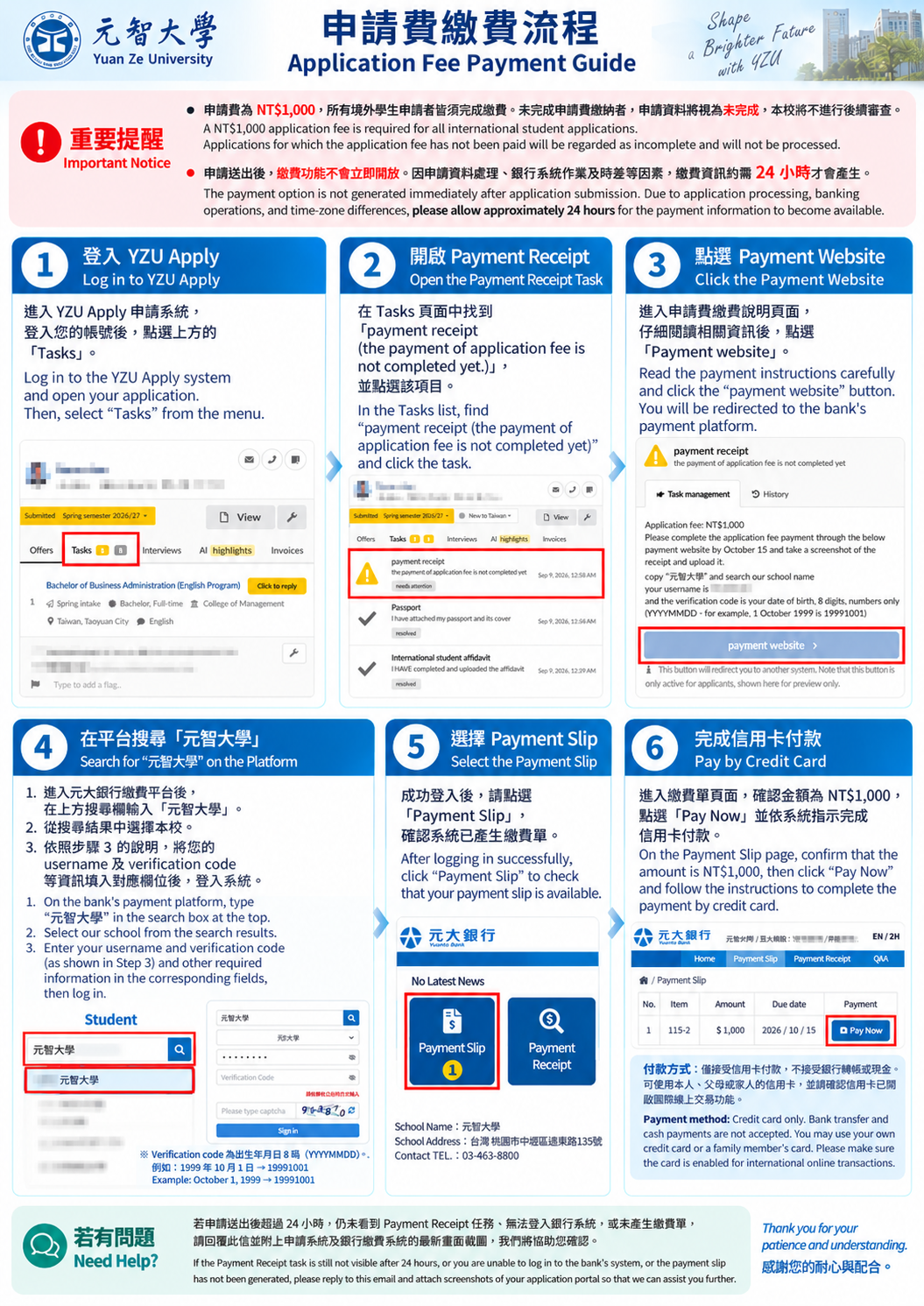
EN Application Fee:NT$1,000
*Applications for which the application fee has not been paid will be regarded as incomplete and will not be processed.
*Please allow approximately 24 hours before making the payment.
The payment option is not generated immediately after application submission. Due to application processing, banking operations, and time-zone differences, please allow approximately 24 hours for the payment information to become available.
STEP 1 | Log in to YZU Apply and open your submitted application. Then, select Tasks from the menu.
STEP 2 | Open the Payment Receipt Task.
STEP 3 | Go to the Bank’s Payment Platform.
*Carefully read the payment information provided under the Payment Receipt task and follow the instructions shown there.
*Click:Payment Website →You will be redirected to Yuanta Bank’s payment platform.
STEP 4| Log in to the Bank’s Payment System
*On the bank’s payment page, type“元智大學” in the search box at the top.
*Return to the Payment Receipt task in YZU Apply and enter the required login information exactly as instructed into the corresponding fields on the bank’s payment page.
*Enter your username and verification Code (YYYYMMDD).
Unable to log in?
If your information is correct but you are still unable to log in, your payment record may still be processing by the bank. Please wait and try again later. There is no need to submit another application.
STEP 5| Check Your Payment Slip
*After successfully logging in to the Yuanta Bank payment platform, select:Payment Slip
*Confirm that your NT$1,000 application fee payment slip is available.
STEP 6| Pay by Credit Card
*On the Payment Slip page, confirm:Amount: NT$1,000
*If the information is correct, click:Pay Now, and follow the instructions to complete the payment by credit card.
Payment Method:
Credit card payment only. Bank transfers and cash payments are not accepted. You may use your own credit card or a card belonging to a parent or family member. Please make sure that the card is enabled for international online transactions.
***Troubleshooting***
If it has been less than 24 hours since you submitted your application, please allow additional time for the payment information to be generated.
If, after 24 hours, the Payment Receipt task is still unavailable, you are still unable to log in to the bank’s system with the correct information, or your Payment Slip has not been generated, please contact us and attach updated screenshots of YZU Apply and/or the bank’s payment system so that we can assist you.
Thank you for your patience and understanding.